
Megastore Tidy Up Together Store sweep checklist
Toy, Super, and Mega remaining-count habits, last-item hunts, Unstuck Product, and when to save.
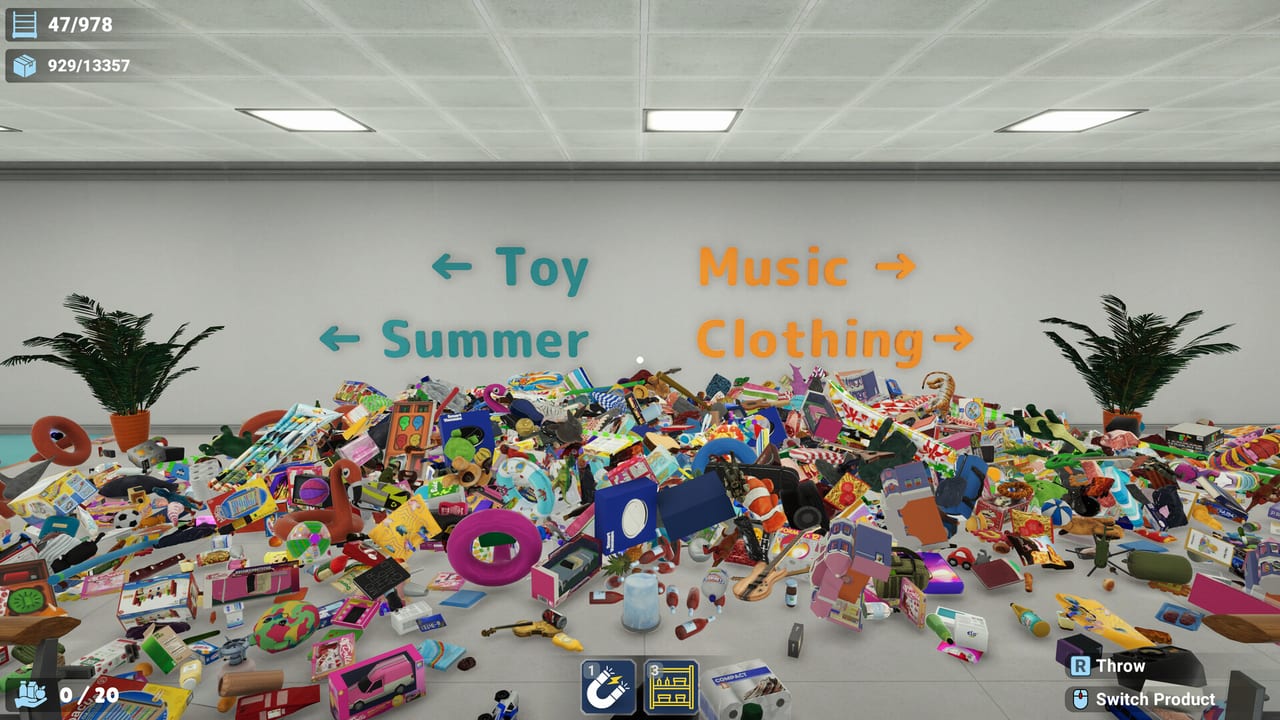
Use this checklist while a store is open, not as a lore page. Megastore: Tidy Up Together launched on 2 September 2026 with three shops: Toy Store (3,555 products, 297 shelves), Supermarket (7,934 products, 487 shelves), and a two-story Megastore (13,380 products, 978 shelves, nine departments). Solo and online co-op share the same HUD remaining counts. The job is to make those numbers hit zero without losing two hours to one crate in geometry.
Keep this tab beside the Getting Started guide on your first Toy Store, then beside the matching store walkthrough when you move up. Pair it with sorting faster once the loop is familiar. Return to the Tools Hub if you need the spec sheet instead of a sweep order.
Shared sweep (every store)
- Read the department sign before you pick anything up. Wrong-department carries waste stack space.
- Write down the HUD remaining item count and remaining shelf count as you enter. Write them again as you leave. If neither number moved, you did not finish the room.
- Clear the floor first, then waist-height decks, then top shelves, then behind counters and endcaps. Height order beats color order when you are tired.
- Group matching products in hand before you walk a shelf. A mixed stack is a second trip.
- Fill one shelf type to completion before you hop to a new fixture. Half-done gondolas are how last-item hunts start early.
- When remaining items drop into the low dozens, stop opening new departments. Switch to the last-item hunt below.
- If the HUD stalls on a number you cannot see, run Unstuck Product, save, then hunt. Do not start a new aisle while four SKUs are missing.
- Save when a department’s remaining count hits zero. Steam Cloud will sync; a crash mid-carry will not.
Hotfix 1.0.1 (3 September 2026) pauses time in the ESC menu when you are the only player in the session. Solo players can stop, save, and think. Co-op still needs a spoken remaining-count call so two people do not hunt the same last box. Split roles with the co-op guide and co-op roles.
Toy Store — 3,555 / 297
Treat Toy as the training loop. Learn signs, grouping, and HUD trust here, then leave. Follow the Toy Store walkthrough for fixture order; this checklist is the audit you run at the end of each corner.
- Enter, note remaining items and shelves, then sweep the open floor so you can see fixture feet.
- Plush and puzzle corners hide product on top decks and behind low bins. Hotfix 1.0.1 moved Puzzle Foam V from a top shelf in the corner plushie section to the floor on new saves — look on the ground before you assume it is stuck.
- Do not spend skill points chasing Mega problems. Long Reach and stack capacity matter more once Super unlocks; see best skills.
- Last-item hunt: perimeter of the shop, then the register, then the original dump piles. Toy is small enough that a full lap is cheaper than Unstuck as a first move.
- Save when remaining hits zero and the store completes. That file is your clean baseline before Super.
Supermarket — 7,934 / 487
Aisles are long enough to lose a crate behind a pallet. Use the Supermarket guide for department order, then this list as the door check.
- Pick a department, write the HUD numbers, and finish that department before you cross the store for a matching color you spotted in produce.
- Co-op: one player fetches, one player shelves a single department. Crossing the whole grocery for “whatever is in hand” duplicates walking.
- Unstuck Product: hotfix 1.0.1 added a small Supermarket area that was missing from its coverage. If a remaining count will not drop after a full aisle lap, run Unstuck before you assume the HUD is wrong.
- Last-item hunt: endcaps, the back of freezer runs, under displays, and the floor along the loading side. Do not open a new department at 20 remaining.
- Save at each department door. Super is long enough that a crash in hour six hurts.
Megastore — 13,380 / 978, two stories, nine departments
The Megastore is a building, not a room. Use the Megastore walkthrough for floor logic. This checklist is how you keep nine departments from blurring.
- Assign floors in co-op before anyone picks up a product. One team owns upstairs, one owns downstairs, and escalators are a handoff, not a hunting ground. Solo players should finish one floor’s departments before they ride.
- Log HUD remaining counts at each department entrance and at the escalator. A number that did not move means a top deck, a backstock hole, or geometry.
- Do not mix a last-item hunt with restocking a fresh department. When remaining is small, the only job is those SKUs.
- Last-item hunt: atrium edges, escalator landings, fixture tops that you cannot see from the floor, and the far wall of each of the nine departments. Product Highlight and Shelf Highlight (if unlocked) are for this phase, not for the first thousand items.
- Unstuck Product is a Megastore tool, not a Toy Store panic button. Use it when the HUD and your eyes disagree after a full department lap.
- Save after every department and before you quit. Cloud will keep the file; quitting mid-carry will not.
Last-item hunt (all three stores)
When remaining items are few, change behavior:
- Stop grouping for future shelves. Carry only what the HUD still wants.
- Walk a wall-to-wall perimeter, then fixture tops, then under and behind.
- Trust the remaining count. If you can see empty floor and the HUD still shows six, something is stuck, in another department, or on a shelf you already marked done.
- In co-op, one hunter, one spotter. Two hunters in the same aisle miss the other floor.
Unstuck Product and save habits
Unstuck Product lives in the game settings / pause flow. It is there to recover items in geometry, not to skip a sweep. After hotfix 1.0.1, Supermarket coverage is wider; if a count still will not move, save, run Unstuck, then hunt once. Do not spam it between every shelf.
Save rules that survive a long night:
- Save when a department remaining count hits zero.
- Save before you Alt-F4, and before you invite a late co-op partner.
- Solo: ESC pauses time after 1.0.1 when you are alone — use that to save, not to AFK in an aisle.
- Do not keep two conflicting local copies if you also use Steam Cloud. One good cloud file beats a newer broken one.
For pace upgrades after the sweep is clean, read sorting faster and the skill ranking. For a friend joining tonight, send system requirements first.
When the Megastore HUD still shows four items after you have walked both floors twice, stop restocking random endcaps. Run Unstuck Product, save, and hunt only those four SKUs. Logging the remaining count at each department door is the habit that ends a twelve-hour session with an open store instead of a ghost aisle.
Frequently Asked Questions
Quick answers to the most common questions.
What should I write down from the HUD?
Remaining items and remaining shelves, at each department door. If neither number moved, the room is not done — look up, behind, and then use Unstuck Product.
When do I switch from sweeping to a last-item hunt?
When remaining items are in the low dozens, stop opening new departments. Perimeter, tops, and backs only. The sorting faster page covers the earlier bulk loop.
Does Unstuck Product replace a sweep?
No. Sweep first. Use Unstuck when the HUD disagrees with a finished lap. Hotfix 1.0.1 added a missing Supermarket area to its coverage.
How often should I save?
After each finished department, and before you quit. Steam Cloud is on. Solo ESC pauses time after hotfix 1.0.1 when you are the only player.
Should co-op partners share one checklist?
Yes. Call remaining counts out loud and split floors or departments. See co-op roles so two people are not hunting the same last crate.
Which store should I run this on first?
Toy Store (3,555 / 297). Learn HUD trust there, then reuse the same door-check on Super and Mega. Start with the Toy Store walkthrough.