
Megastore Tidy Up Together Controls
HUD prompts, rebinds, FOV, and the LT grab conflict so you can tidy without dropping a 20-item stack.
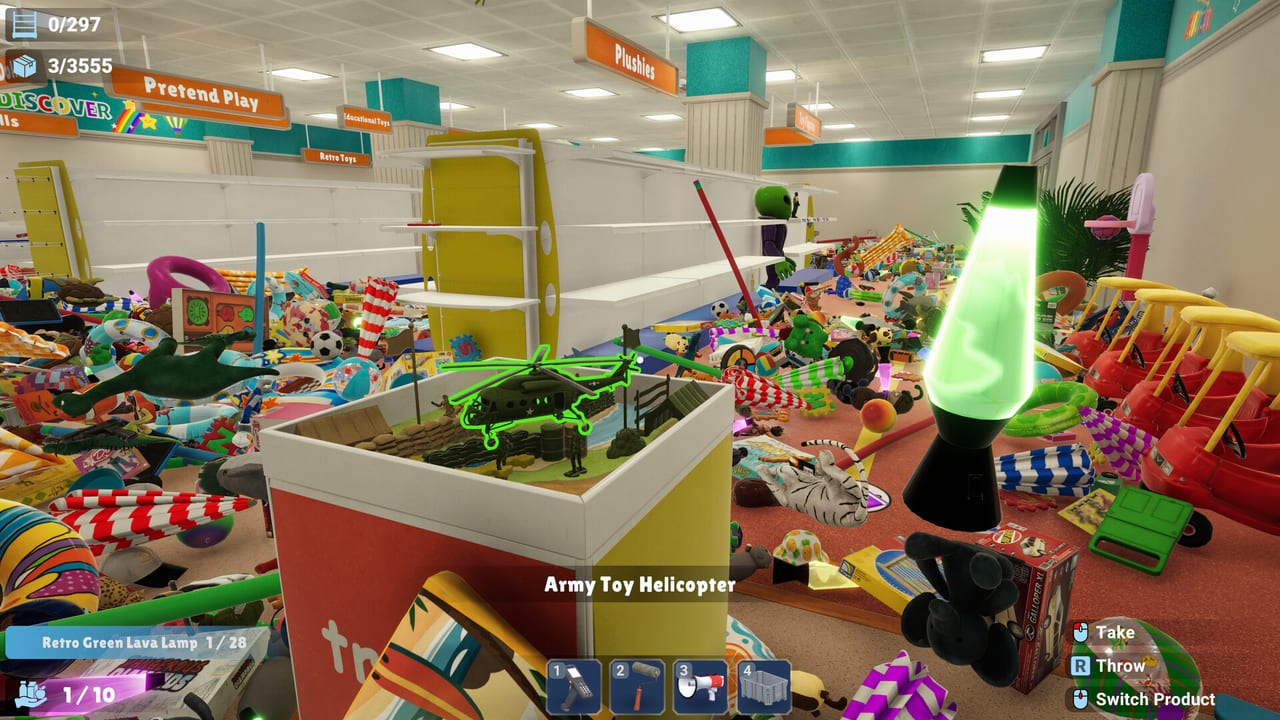
Megastore: Tidy Up Together is a first-person Steam Windows game with fully rebindable controls, FOV, and mouse sensitivity. Yolo Games Studio lists full controller support, and the HUD is built around a few labeled actions rather than a hidden combo list. If you skip this page, you will still finish the Toy Store, but you will fight the binds when the Megastore asks you to throw, switch SKUs, and fire a magnet pull in the same atrium.
This is not a local-split-screen-only title. Online co-op and solo share the same first-person rig. Everyone in a lobby should rebind before the first shelf, because Throw and abilities are easy to mash on a gamepad while a partner is lining up a green bay.
HUD actions that matter
The on-screen prompts are the source of truth. Defaults can be rebound; the labels stay the same.
| HUD prompt | What it does in play |
|---|---|
| Take | Pick up the focused product. Matching SKUs glow green. |
| Throw (R) | Toss the current item. Labeled R on the HUD. Use it to seed a pile next to the correct bay, not to yeet stock into the atrium. |
| Switch Product | Cycle the auto-sorted stack in your hands so the facing you look at gets the SKU it wants. |
| Numbered abilities (1–4) | Fire the skill currently drawn on that slot. Early Toy Store bar: flashlight, paint roller, megaphone, crate. Later bars add magnet-style pull and a compact/stack tool. |
| Carry stack (bottom-left) | Shows how many items you hold versus cap. 10 at Toy Store start; 20 appears after capacity upgrades. |
Look and move use a standard first-person layout and are rebindable. Do not assume a wiki can list every keyboard key after you customise them. Open the in-game map once, set FOV so high shelves are readable, and raise or lower mouse sensitivity until you can flick from a floor pile to a top bay without overshooting.
Green highlight is not a bind, but it is part of aiming. If a product or shelf is not green, Switch Product or walk to a different sign. Carried items auto-sort by category in hand; that is why cycling the stack is faster than dropping everything.
Keyboard and mouse versus controller
Keyboard and mouse are the more reliable pair on day-one patches. Full controller support exists, but players report LT grab overlapping abilities. That collision is miserable when slot 1 is a magnet pull and you only meant to pick up a yoyo. If you insist on a pad:
- Rebind grab away from the same trigger you use for skills.
- Put Throw on a face button you will not brush while steering.
- Keep numbered abilities on the d-pad or bumpers, not on the grab analog.
- Test Long Reach and stack tools in the Toy Store before you host co-op.
Hosts should say which device they expect. A mouse player lining up a 1/28 lava lamp does not want a pad user magnet-pulling the same bay.
Settings that change how the store feels
FOV: raise it enough to see department arrows (Toy / Summer / Music / Clothing style walls in the Megastore) without turning into a fisheye that hides floor SKUs at your feet.
Mouse sensitivity: too high and you skip the green outline; too low and a 978-shelf remaining HUD will feel like a commute.
Unstuck Product: added in hotfix 1.0.1 (3 September 2026). Use it when a large SKU clips after hold-pose adjustments in that patch.
ESC: after 1.0.1 the timer pauses when you are the only player. In a populated lobby, do not assume ESC is a full freeze for everyone.
Difficulty and skills-on versus skills-off are not keybinds, but they change what the number keys do. A no-skill run still needs Take, Throw, and Switch Product. The achievement tracker for finishing a store without skills was repaired in 1.0.1; do not fire a magnet pull “just once” on that save.
Ability bar without fake tree names
This wiki only treats Long Reach (+1 m) and +3 Stack Capacity as official named perks. A launch bug granted +6 capacity; 1.0.1 corrected it. Other icons you will see — magnet-style pull, compact/stack, flashlight, paint roller, megaphone, crate — are described by what they look like on the HUD. Rank them on best skills and solo versus co-op. Player reports say hidden tokens can feed arcade machines for extra buffs; that is not a control scheme, it is a pickup.
Faster ground collection also landed in 1.0.1, so holding Take over a floor pile feels snappier than launch night. You still cannot vacuum an entire department unless you choose a pull-style ability and accept the mess it makes of sorted stacks.
Practice routine (five minutes)
In the Toy Store before you unlock anything else:
- Fill the 10-stack with one family (plush, figures, or summer rings).
- Switch Product until the SKU in hand matches the green bay.
- Place until the facing count ticks, then Throw leftovers into a neat pile at your feet instead of across Pretend Play.
- Fire each numbered slot once in an empty aisle so you know which icon is flashlight versus crate.
- If you are on a pad, confirm grab does not also pop slot 1.
Then run the Getting Started session plan and the sorting route. The same binds carry into the Supermarket. For a 13k remaining Megastore, bad binds cost more time than a missing perk.
Until a later patch splits grab from abilities on gamepad, treat keyboard and mouse as the default tidy kit, and keep Long Reach on a number key you can hit without dropping the stack.
Frequently Asked Questions
Quick answers to the most common questions.
What does Throw actually do?
The HUD labels Throw as R. It tosses the current SKU. Use it to park items next to the right bay, not to lose them on an escalator. See the Megastore walkthrough for why atrium throws hurt.
Why is Switch Product on the HUD?
Carried items auto-sort by category. Switch Product cycles the stack so you place the matching SKU on a green shelf without dropping the whole load. It matters as soon as the stack is 10, and more at 20.
Does the game support a controller?
Yes, full controller support. Players still report LT grab overlapping abilities. Rebind grab off the skill trigger or use keyboard and mouse. Compare devices in solo versus co-op.
Can I pause the completion timer?
After hotfix 1.0.1, ESC pauses the timer when you are the only player. In online co-op do not assume a personal pause.
Where do I rebind before inviting friends?
Do it on first boot, then host. The co-op guide and Getting Started pages assume Throw and abilities are already safe to mash.